


Rahul Guleria
SEO Executive
Creative,
Branding
& Growth
in the Global
Digital Ecosystem
Write Something....
Conversion tracking for performance marketing measures valuable actions users take after interacting with a marketing campaign, such as making a purchase, submitting a lead form, booking a demo or installing an app. It connects advertising activity with measurable business outcomes, helping marketers understand campaign performance, evaluate acquisition costs and make informed optimisation decisions.
Without reliable conversion tracking, you may know how many people clicked your ads but struggle to determine whether those clicks generated meaningful results.
For example, a campaign that attracts thousands of visitors may generate fewer qualified leads than a smaller, more targeted campaign. Conversion tracking helps you identify this difference and make better decisions about your marketing budget.
Whether you run Google Ads, Meta Ads or campaigns across multiple channels, understanding conversion tracking is essential for measuring performance effectively.
To understand which results matter most, explore our guide to Performance Marketing KPIs: 15 Metrics That Actually Matter.
Conversion tracking is the process of recording and measuring specific actions that users complete after interacting with your marketing activities.
These actions are called conversions. They represent progress towards a business goal, such as generating a qualified lead, completing a purchase or securing a subscription.
Conversion tracking connects campaign activity with these outcomes through measurement tools, website tags, pixels, software development kits (SDKs) or server-side integrations.
For instance, an online retailer can track completed purchases and their values. A B2B company can measure demo bookings and later connect those leads to sales outcomes in its customer relationship management (CRM) system.
The objective is to understand which marketing activities contribute to valuable results rather than evaluating campaigns through clicks and impressions alone.
A conversion depends on the objective of your campaign.
Common examples include:
Not every tracked action has the same business value. A newsletter signup, for example, may indicate interest, while a completed purchase directly generates revenue.
Before setting up conversion tracking, define what counts as a meaningful outcome for your business.
Conversion tracking helps marketers evaluate the relationship between advertising spend and business results.
Its main benefits include:
1. Measure campaign effectiveness
Identify which campaigns generate purchases, leads, bookings or other intended outcomes.
2. Understand acquisition costs
Calculate how much you spend to generate a defined conversion, such as a new customer or qualified lead.
3. Improve budget allocation
Use reliable performance data to identify where additional investment may be justified and where campaigns need improvement.
4. Improve targeting and campaign optimisation
Where supported, advertising platforms can use conversion signals to help optimise delivery towards users more likely to complete the desired action.
5. Identify problems in the customer journey
Compare interactions at different stages to understand where potential customers abandon the process.
6. Connect marketing activity with business results
When combined with CRM and sales data, conversion tracking can help determine whether leads eventually become paying customers.
However, tracking alone doesn't improve campaign performance. Results depend on measurement quality, campaign strategy, sufficient data and the actions marketers take based on the findings.
Click tracking and conversion tracking measure different stages of the customer journey.
Click tracking records interactions with advertisements, while conversion tracking measures whether a specified action occurs.
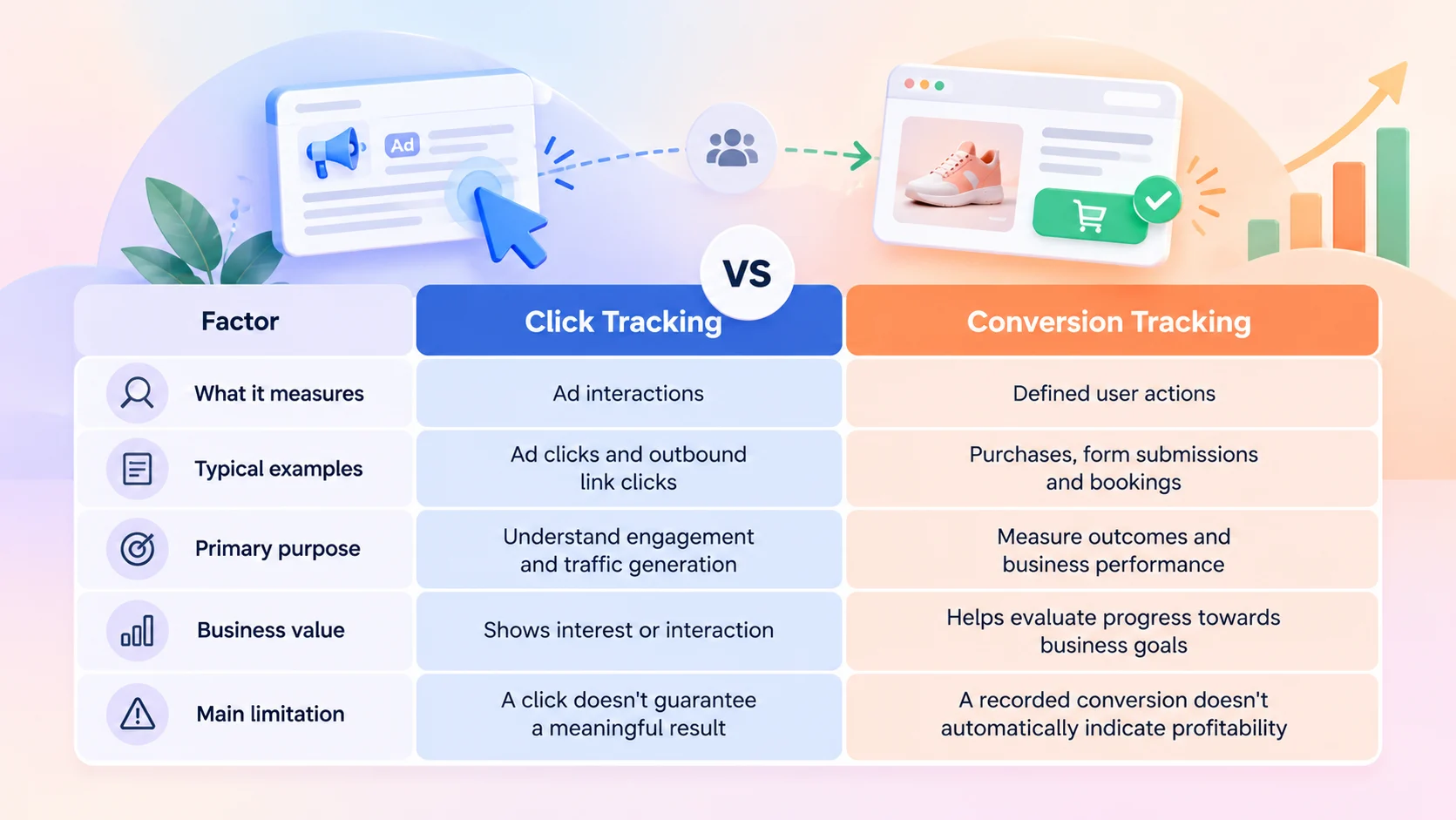
Factor | Click Tracking | Conversion Tracking |
|---|---|---|
What it measures | Ad interactions | Defined user actions |
Typical examples | Ad clicks and outbound link clicks | Purchases, form submissions and bookings |
Primary purpose | Understand engagement and traffic generation | Measure outcomes and business performance |
Business value | Shows interest or interaction | Helps evaluate progress towards business goals |
Main limitation | A click doesn't guarantee a meaningful result | A recorded conversion doesn't automatically indicate profitability |
A campaign can generate many clicks without producing enough qualified leads or sales.
Similarly, a high conversion count doesn't necessarily mean a campaign is profitable. You must consider conversion quality, acquisition costs, revenue and other relevant business factors.
Conversion tracking connects an advertising interaction to a measurable action through a sequence of events.
The exact implementation depends on the platform, website or app, and the measurement tools being used.
Here's how the process typically works.
Step 1: A user interacts with an advertisement.
Someone sees your advertisement and clicks it, visits your website or interacts with another campaign destination.
Step 2: The user visits your website or app.
The visitor arrives on a landing page, product page, registration screen or another destination.
Step 3: A tracked action occurs.
The user completes an action you've defined as a conversion, such as submitting a form or purchasing a product.
Step 4: The measurement system records the event.
A website tag, advertising pixel, app SDK or server-side integration records the action, depending on the implementation.
Step 5: The event is sent to the relevant platform.
The event reaches an analytics or advertising platform for processing and reporting.
Step 6: The platform reports the conversion.
Where the necessary information and eligibility requirements are met, the platform may associate the conversion with relevant campaign interactions according to its attribution settings.
Step 7: Marketers analyse the results.
Marketing teams review conversion counts, costs, values and other metrics to identify opportunities for improvement.
The process can be summarised as:
Ad interaction → Website or app visit → Conversion event → Measurement platform → Campaign analysis → Optimisation
Not every conversion can be attributed to a specific advertisement. Consent choices, browser restrictions, cross-device activity and other measurement limitations can affect what platforms record and report.
Different conversion types help marketers understand different parts of the customer journey.
A useful measurement plan separates major business outcomes from supporting interactions.
Macro conversions represent the primary outcomes a business wants to achieve.
Examples include:
These actions generally have a direct relationship with revenue, customer acquisition or another major business objective.
For an e-commerce business, a completed purchase may be the primary conversion. For a B2B company, a qualified sales opportunity may be more meaningful than a basic enquiry.
Define macro conversions according to your business model rather than treating every tracked event as equally important.
Micro conversions are smaller actions that indicate interest or progress towards a primary conversion.
Examples include:
These actions can help you understand user behaviour and identify friction in the customer journey.
For example, many visitors adding products to their carts but few completing purchases may indicate a checkout issue, unexpected delivery costs or another barrier.
However, micro conversions should not be treated as equivalent to revenue-generating outcomes. A campaign that produces many brochure downloads may still struggle to generate qualified leads.
Use micro conversions to diagnose behaviour while keeping the primary business objective at the centre of campaign optimisation.
Online conversions happen through digital interactions, such as website purchases, app registrations or online form submissions.
Offline conversions happen outside the immediate online interaction. Examples include a lead becoming a customer after a sales call, a showroom purchase or a contract signed following an in-person meeting.
Businesses with longer sales cycles may benefit from connecting online lead-generation data with CRM records and offline sales outcomes.
For example, an advertisement might generate a form submission today, but the prospect may become a paying customer several weeks later.
Importing eligible offline conversion data can help marketers understand which campaigns generate customers rather than simply collecting contact details.
This requires appropriate data management, reliable identifiers where permitted, and compliance with applicable privacy and consent requirements.
The tools you need depend on your marketing channels, website or app setup, reporting requirements and business model.
A small website may need only a few measurement tools, while a business running multiple paid campaigns and managing a large sales pipeline may need a more integrated setup.
Google Analytics 4 helps businesses understand how users interact with their websites and apps.
It collects configured events and provides reporting on user activity, traffic sources and conversion-related behaviour.
Key capabilities include:
GA4 distinguishes between collected events and events designated as important business outcomes. Current reporting terminology and available configuration options should be checked against Google's documentation.
GA4 is useful for understanding what happens after visitors arrive on your website, although its reporting may differ from the numbers shown in advertising platforms.
Google Ads conversion tracking measures actions associated with advertising campaigns.
Depending on the implementation, businesses can use a Google Ads tag, import eligible GA4 events or connect supported integrations.
Common conversion actions include purchases, lead form submissions, calls and bookings.
Conversion values can help distinguish between actions with different business outcomes. For example, a completed purchase worth ₹5,000 has a different financial value from a low-intent enquiry.
Accurate conversion tracking also supports automated bidding strategies that use conversion or conversion-value signals.
Before choosing a setup, define which conversion actions should guide optimisation and ensure the same outcome isn't counted twice through overlapping implementations.
Meta Pixel is a browser-based measurement tool used to send configured website events to Meta.
Conversions API supports sending eligible event data from a business's server or other supported sources to Meta.
Using browser and server-side measurement together can help improve event coverage in suitable implementations. However, it requires correct configuration and attention to privacy requirements.
When both methods report the same event, appropriate event deduplication is important to prevent duplicate counting.
For example, a purchase recorded through the Pixel and reported again through Conversions API should be handled according to Meta's event-matching and deduplication requirements.
The correct setup depends on the website platform, available integrations and the business's data practices.
Google Tag Manager helps teams manage supported measurement tags and configure triggers without manually editing website code for every change.
It can support implementations involving analytics events, advertising tags and other compatible measurement tools.
Common uses include:
Google Tag Manager doesn't automatically guarantee accurate tracking. Incorrect triggers, duplicated tags and poorly configured events can still produce unreliable data.
Testing each implementation is essential.
A customer relationship management system stores information about leads, opportunities and customers.
Connecting CRM data with marketing measurement can help businesses evaluate the quality of the leads their campaigns generate.
For example, a marketing team might initially record a demo booking as a conversion. The sales team can later identify whether the prospect attended the demo, entered a qualified opportunity stage or became a paying customer.
Where supported and permitted, relevant offline outcomes can be imported into advertising platforms.
This gives marketers a clearer view of the relationship between advertising activity and eventual sales.
The integration should use appropriate data controls, reliable records and the applicable consent and privacy safeguards.
Important: Analytics and advertising platforms regularly update their features and terminology. Always consult the current documentation for the platform and integration you're implementing.
A reliable implementation starts with business objectives and ends with testing, validation and ongoing monitoring.
Use the following process to build a measurement setup that supports meaningful campaign decisions.
Start by identifying what the campaign should achieve.
Possible objectives include:
Be specific. A campaign intended to generate qualified B2B leads needs a different measurement plan from a campaign designed to increase online sales.
Your conversion definition should reflect a meaningful business outcome rather than an easy-to-measure interaction.
Map the actions that matter along the customer journey.
For an e-commerce business, the event plan might include product views, add-to-cart actions, checkout progression and completed purchases.
For a lead-generation business, it might include form starts, form submissions, qualified leads and confirmed sales.
Separate primary conversions from supporting events.
For example:
Business Objective | Primary Conversion | Supporting Events |
|---|---|---|
Online sales | Completed purchase | Product view, add to cart, checkout start |
Lead generation | Qualified lead or defined lead submission | Form start, service-page visit, brochure download |
Demo bookings | Confirmed demo booking | Pricing-page visit, booking-page visit |
App growth | Completed registration or another defined app outcome | App install, onboarding completion |
Not every supporting event needs to be sent to every platform or used for automated bidding. Select events according to your reporting and optimisation requirements.
Set up the events needed to understand user behaviour and important business outcomes.
Depending on your website and measurement requirements, events may be collected through an existing integration, Google Tag Manager or another supported implementation method.
For example, an online store might collect purchase events with transaction identifiers, values and currency information.
A lead-generation website might record successful form submissions rather than simply tracking visits to the form page.
After confirming that an event is collected correctly, designate the appropriate events as key events in GA4 according to your reporting needs.
Test the implementation before relying on the resulting reports.
Choose the measurement approach that best fits your requirements.
Common options include implementing a Google Ads conversion tag or importing eligible GA4 events.
The appropriate approach depends on the type of conversion, reporting needs, bidding strategy and existing implementation.
Pay attention to the following:
For example, a purchase could be recorded by a native Google Ads tag and an imported GA4 event. If both are included as primary conversion actions without appropriate planning, campaign reporting and optimisation may be distorted.
Document which actions are intended to guide bidding and which are used primarily for analysis.
If you're advertising on Facebook or Instagram, configure the appropriate Meta measurement tools for your website and campaign goals.
Meta Pixel can record eligible browser events. Conversions API can send supported events through a server-side or other compatible integration.
Depending on your setup, you may use an official platform integration, a supported e-commerce integration or a custom implementation.
Verify that:
Don't assume that installing the Pixel automatically establishes a complete measurement system. Each relevant event needs to be configured and tested.
UTM parameters help identify campaign traffic in analytics reports.
Common parameters include:
For example, a campaign URL might contain parameters identifying Google as the source, paid search as the medium and a specific product launch as the campaign.
Use consistent naming conventions across campaigns. Avoid creating multiple spellings or naming variations for the same channel.
Remember that UTM parameters support traffic-source analysis. They do not replace conversion tags, event tracking or the attribution mechanisms used by advertising platforms.
Never assume that tracking works simply because the tags have been installed.
Test the full conversion journey using the relevant debugging and testing tools.
Check whether:
For purchases, use a controlled test process where supported and avoid unintentionally creating live transactions.
Testing should cover the actual customer journey, not just the presence of a tag on a page.
Once events are working, review the resulting reports and document any limitations.
Compare analytics and advertising platform reports while recognising that their attribution methods may differ.
Check consent settings, data collection configurations and applicable privacy requirements. Ensure that the implementation respects users' choices and the rules relevant to your business and audience.
Document the conversion definitions, tags, event parameters and attribution settings used by the team.
This creates a reference for future troubleshooting and helps prevent measurement changes from going unnoticed.
For more guidance on paid campaign implementation and optimisation, read our article on Google Ads for Performance Marketing: Strategy & Optimisation.
Once conversion tracking is working, focus on metrics that help explain business performance.
Each metric answers a different question. Use consistent definitions and reporting windows when comparing campaigns.
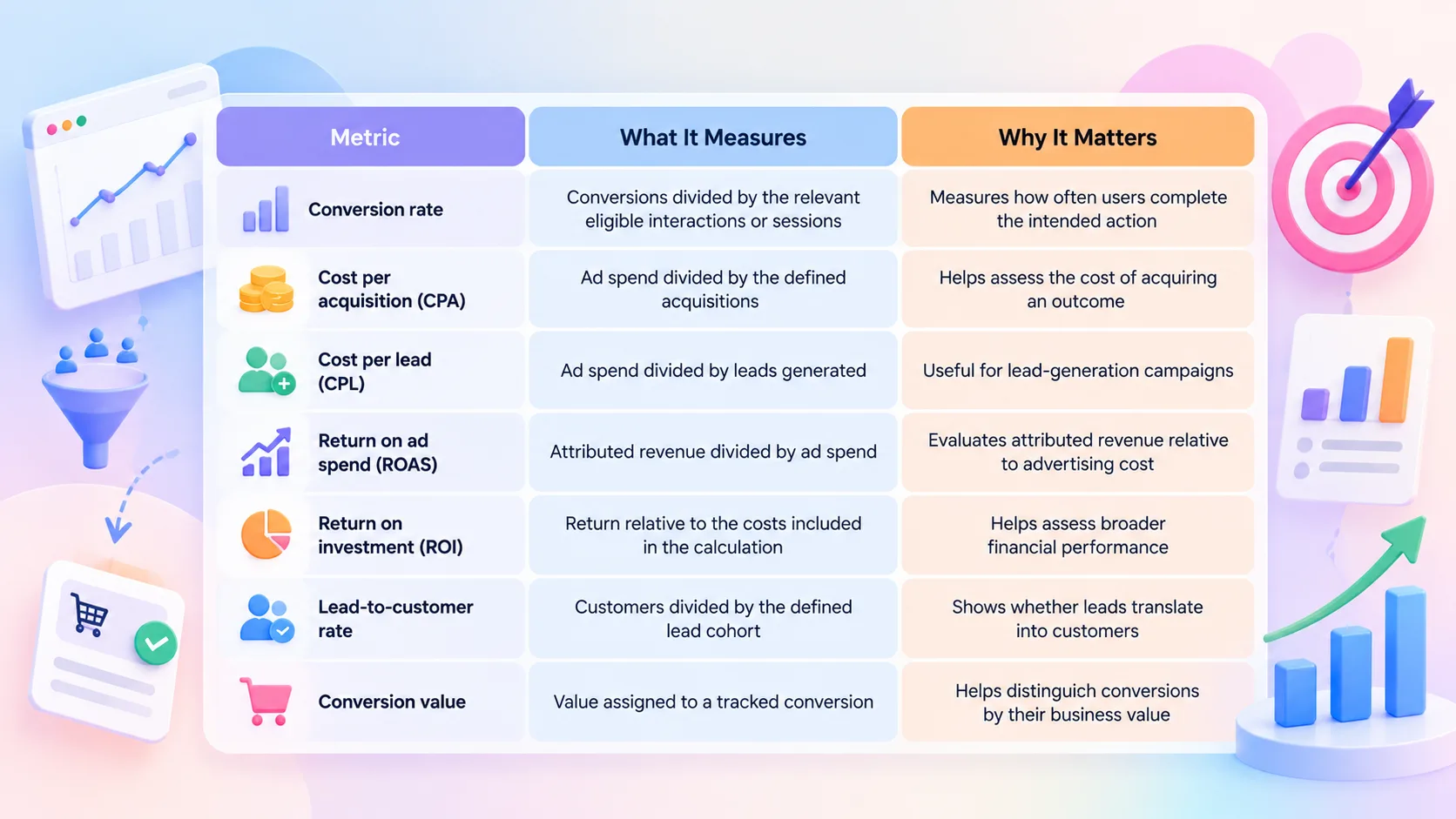
Metric | What It Measures | Why It Matters |
|---|---|---|
Conversion rate | Conversions divided by the relevant eligible interactions or sessions | Measures how often users complete the intended action |
Cost per acquisition (CPA) | Ad spend divided by the defined acquisitions | Helps assess the cost of acquiring an outcom |
Cost per lead (CPL) | Ad spend divided by leads generated | Useful for lead-generation campaigns |
Return on ad spend (ROAS) | Attributed revenue divided by ad spend | Evaluates attributed revenue relative to advertising cost |
Return on investment (ROI) | Return relative to the costs included in the calculation | Helps assess broader financial performance |
Lead-to-customer rate | Customers divided by the defined lead cohort | Shows whether leads translate into customers |
Conversion value | Value assigned to a tracked conversion | Helps distinguish conversions by their business valu |
Conversion rate measures how often users complete a desired action relative to a defined number of eligible interactions or sessions.
The denominator matters. A rate based on sessions may differ from one based on users or ad clicks.
For example, if 1,000 eligible sessions produce 50 completed purchases, the session-based conversion rate is 5%.
Use the same definition when comparing campaigns over time.
CPA measures the advertising cost associated with acquiring a defined outcome.
Formula: CPA = Advertising Spend ÷ Number of Defined Acquisitions
If a campaign spends ₹20,000 and generates 40 acquisitions, the CPA is ₹500.
Whether that result is good depends on the value of each acquisition, business margins and the costs included in your broader economics.
Also clarify whether CPA refers to a purchase, qualified lead, paying customer or another specific outcome.
CPL measures how much advertising spend is required to generate a lead.
Formula: CPL = Advertising Spend ÷ Number of Leads Generated
A lower CPL may indicate more efficient lead generation, but it doesn't necessarily mean better business performance.
A campaign that generates inexpensive but unqualified leads may perform worse than one that generates fewer, higher-quality prospects.
Where possible, evaluate CPL alongside lead qualification and lead-to-customer conversion rates.
ROAS compares attributed revenue with advertising spend.
Formula: ROAS = Attributed Revenue ÷ Advertising Spend
If a campaign generates ₹1,50,000 in attributed revenue from ₹30,000 in advertising spend, its ROAS is 5.
That means the platform attributes ₹5 in revenue to every ₹1 spent on advertising.
ROAS doesn't automatically indicate profitability because it may exclude product costs, salaries, fulfilment expenses and other operating costs. Attributed revenue also isn't necessarily incremental revenue that would not otherwise have occurred.
ROI evaluates the return relative to the costs included in the calculation.
A commonly used formula is:
ROI = (Return − Total Included Costs) ÷ Total Included Costs × 100
Define the return and costs consistently before calculating ROI.
For example, a business assessing a campaign may include advertising spend, creative production and other campaign-related expenses rather than looking at media spend alone.
ROI can provide a broader view of financial performance than ROAS, but the result depends on the calculation method.
This metric measures how many leads become customers.
Formula: Lead-to-Customer Rate = Customers ÷ Defined Lead Cohort × 100
For example, if 100 leads eventually produce 10 customers, the lead-to-customer rate is 10%.
Make sure the lead cohort has had enough time to progress through the sales cycle. Comparing recent leads with older leads can produce misleading conclusions.
Conversion value assigns a monetary or other defined value to a tracked action.
For an e-commerce business, it may represent the value of a completed purchase. For lead generation, businesses may assign values based on expected revenue or estimated lead quality.
Use a clear and consistent method. Incorrect values can distort reporting and may lead automated bidding systems towards the wrong outcomes.
For a related explanation of advertising efficiency and broader financial returns, read ROAS vs ROI: What's the Difference in Performance Marketing?.
Google Ads and Meta Ads both support conversion measurement, but their tools, attribution methods and reporting environments differ.
Factor | Google Ads | Meta Ads |
|---|---|---|
Common use cases | Search, Shopping, Display and other Google campaigns | Facebook, Instagram and other Meta placements |
Typical tracking options | Google Ads tag, eligible GA4 imports and supported integrations | Meta Pixel, Conversions API and supported integrations |
Useful conversion examples | Leads, purchases, calls and bookings | Leads, purchases, registrations and other website actions |
Main considerations | Conversion actions, attribution settings, tag setup and bidding goals | Event setup, attribution settings, browser/server events and deduplication |
Reporting differences | Uses Google Ads' configured attribution and reporting settings | Uses Meta's configured attribution and reporting settings |
The two platforms may record different numbers for what appears to be the same business outcome. This doesn't automatically mean one implementation is broken.
Several factors can explain reporting differences.
Different attribution settings
Platforms may assign credit to campaign interactions using different attribution methods and reporting windows.
Different conversion definitions
One platform may count a particular event as a primary conversion, while another may report a different event or apply a different counting method.
Consent and measurement limitations
User consent choices, browser restrictions and other technical limitations can affect which interactions are observable.
Cross-device customer journeys
A person may discover a product on one device and purchase it on another. The platforms may have different information available to associate those interactions.
Reporting delays
Recent conversions may not appear immediately, and reports can be updated as additional information becomes available.
Event implementation issues
Missing tags, duplicate events, incorrect values or inconsistent event definitions can create further differences.
Use a consistent framework when evaluating results across advertising platforms.
Don't simply add Google Ads and Meta Ads conversion totals together. A single customer may interact with both platforms before converting, so their reported conversions may overlap.
For additional guidance, read our article on Meta Ads for Performance Marketing: Strategy, Targeting & Optimisation.
Even a well-planned campaign can produce misleading results when conversion tracking is configured incorrectly.
The following mistakes are worth checking before launch and during regular audits.
Clicks show that users interacted with an advertisement, but they don't prove that the campaign generated valuable results.
How to fix it: Define primary conversions that reflect business goals. Use click and engagement metrics as supporting indicators rather than substitutes for meaningful outcomes.
Duplicate tags or overlapping event implementations can inflate conversion counts.
For example, a purchase might be recorded through multiple tracking configurations without appropriate deduplication.
How to fix it: Review your event architecture, test conversion journeys and verify deduplication wherever multiple systems report the same event.
A purchase event may report the wrong currency or omit its transaction value. This can distort revenue reporting and optimisation.
How to fix it: Test event parameters and compare reported values with the underlying transaction or order records.
A tag may fail after a website update, form redesign or checkout change.
How to fix it: Test important conversion events before launch and repeat those tests after significant website changes. Monitor for unexpected drops in recorded events.
A campaign can generate many form submissions without generating qualified prospects or customers.
How to fix it: Connect eligible lead and sales data through a CRM or supported offline conversion integration. Evaluate lead quality and sales outcomes alongside CPL.
Different naming conventions can fragment campaign traffic across analytics reports.
For example, using several variations of the same source or medium may make reporting less consistent.
How to fix it: Establish a shared naming convention and use it consistently across campaign URLs.
Measurement implementations must respect applicable privacy rules and users' consent choices.
How to fix it: Review the relevant consent settings, platform requirements and applicable regulations. Ensure that tags and integrations behave according to the approved data collection approach.
Premature decisions based on partial reporting can lead to unnecessary campaign changes.
For example, a campaign with a longer sales cycle may appear to perform poorly before its leads have had enough time to convert.
How to fix it: Account for reporting delays, conversion lag, data volume and sales-cycle length before making major optimisation decisions.
Conversion tracking gives marketers evidence they can use to evaluate campaigns and identify opportunities for improvement.
It doesn't automatically make a campaign successful, but it can support more informed decisions when the underlying data is reliable.
Compare campaigns using consistent conversion definitions and business outcomes.
You may find that a campaign generating fewer clicks produces more qualified leads, or that certain audience segments have stronger purchase rates.
Investigate the reasons behind these differences before reallocating budgets.
Conversion events can help reveal where users abandon the customer journey.
For example, a large number of visitors may reach a lead form but fail to submit it.
Review the form's length, clarity, mobile usability and relevance to the advertisement. Test improvements and evaluate the results using consistent measurement definitions.
Campaigns that consistently produce valuable outcomes may justify additional investment, provided the economics and business capacity support it.
However, don't make budget decisions using conversion counts alone.
Consider acquisition costs, lead quality, profitability, reporting uncertainty and whether the campaign can maintain its performance as spending changes.
Optimising for the easiest action to measure can lead to poor business outcomes.
A campaign focused exclusively on basic form submissions may generate many leads without producing enough customers.
Where supported, connecting qualification and sales data to advertising measurement can help businesses evaluate more meaningful outcomes.
Ensure that the events used for optimisation reflect the desired business result and can be measured reliably.
Marketing performance becomes easier to evaluate when campaign data can be connected with lead progression and customer acquisition.
A CRM integration can help businesses understand which sources generate qualified prospects, which opportunities become customers and how revenue develops over time.
This is particularly useful for B2B companies and businesses with longer sales cycles.
For more ideas on improving the customer journey, read our guide to How to Improve Landing Page Conversions.
Use this checklist to review your measurement setup before activating a campaign.
Keep a record of the implementation, including event definitions, tag configurations and any known measurement limitations.
This makes future troubleshooting easier and helps the team maintain consistent reporting as campaigns and websites change.
Effective performance marketing depends on more than launching advertisements. Businesses also need reliable measurement, clear objectives and a structured process for improving results.
Conversion tracking connects campaign activity with meaningful business outcomes. When combined with paid media strategy, analytics and conversion rate optimisation, it helps teams understand where campaigns are working and where further investigation is needed.
PulsePlay Digital offers services across Performance Marketing, Paid Media Advertising, Data Analytics and Conversion Rate Optimisation.
A measurement approach should begin with your business objectives, identify the outcomes that matter and establish how those outcomes will be tracked and evaluated.
If your campaigns generate traffic but you're unsure which activities produce qualified leads or revenue, start by reviewing your conversion definitions and tracking implementation.
Explore PulsePlay Digital to learn more about our digital marketing services and how a measurement-focused approach can support better campaign decisions.
Conversion tracking measures actions users complete after interacting with marketing campaigns. These actions may include purchases, form submissions, bookings or registrations. It helps marketers connect advertising activity with defined business outcomes.
It helps marketers evaluate campaign effectiveness, calculate acquisition costs, identify valuable traffic sources and make informed optimisation decisions. Reliable tracking also helps businesses distinguish between campaigns that generate engagement and those that produce meaningful outcomes.
Start by defining your business goal and identifying the events that represent progress towards it. Configure the appropriate analytics and advertising tools, test the events, validate values and check for duplicates. Review reporting settings and consent requirements before relying on the data.
Common tools include Google Analytics 4, Google Ads conversion tracking, Meta Pixel, Meta Conversions API, Google Tag Manager and CRM integrations. The tools you need depend on your marketing channels, website or app setup and measurement requirements.
GA4 helps analyse website and app interactions, traffic sources and user journeys. Google Ads conversion tracking measures configured actions associated with Google Ads campaigns and can support campaign optimisation. The two systems have different reporting purposes and may show different conversion totals.
Meta Pixel sends configured website events through the browser. Conversions API supports sending eligible event data through server-side or other supported integrations. When both methods report the same event, appropriate deduplication helps prevent duplicate counting.
Useful metrics include conversion rate, cost per acquisition, cost per lead, ROAS, ROI, lead-to-customer rate and conversion value. Select metrics according to the business objective and use consistent definitions when comparing performance.
The platforms can use different attribution settings, reporting windows, conversion definitions and measurement methods. Consent choices, cross-device activity, reporting delays and implementation issues can also contribute to differences. Compare equivalent outcomes and avoid adding platform totals without checking for overlap.
A macro conversion represents a major business outcome, such as a completed purchase or qualified lead. A micro conversion represents a smaller action that indicates interest or progress, such as an add-to-cart action, form start or brochure download. Micro conversions help explain user behaviour but aren't equivalent to revenue-generating results.
Yes, in supported implementations. Businesses can connect eligible CRM or sales records with marketing measurement and import offline conversion outcomes into advertising platforms. The process depends on platform capabilities, data quality, appropriate identifiers and applicable privacy requirements.
Check tracking before launching campaigns, after significant website or checkout changes, and during regular performance reviews. High-priority purchase and lead events may require more frequent monitoring. The appropriate schedule depends on campaign volume, business risk and how quickly tracking issues need to be identified.
Conversion tracking provides evidence about which campaigns generate defined outcomes and what those outcomes cost. Marketers can use that information to evaluate targeting, landing pages, budgets and lead quality. Better measurement supports better decisions, but ROI still depends on campaign execution, business economics and the actions taken in response to the data.