

Rahul Guleria
SEO Executive
Creative,
Branding
& Growth
in the Global
Digital Ecosystem
Corporate video production brings your brand story to life through sight, sound, and motion. When done well, it doesn’t just “explain what you do” – it wins attention, builds trust, and nudges viewers towards action across your website, social media, email funnels, and paid campaigns.
In this guide, you’ll walk through practical, battle-tested Corporate Video Production Tips you can use whether you’re a startup founder with a small team or a marketing head in a large enterprise.
Corporate video production is the end-to-end process of planning, scripting, filming, and editing videos for business goals – not entertainment for entertainment’s sake.
In simple words, it’s everything that needs to happen between:
“We should create a video for this”
and
“Our audience watched it, understood it, and took the action we wanted.”
Unlike casual social content, corporate videos sit closer to your brand and revenue. They often support:
● Website landing pages
● Sales decks and pitches
● Product launches
● Internal training and onboarding
● Investor updates
● Brand storytelling campaigns
You can think of corporate video production as a toolbox. Different formats solve different problems:
● Business communication
○ CEO or founder messages
○ Company updates, policy changes, culture videos
○ Town halls or all-hands recordings
● Brand storytelling
○ Brand films
○ Origin stories (“why we exist”)
○ Customer success stories and case studies
○ Behind-the-scenes culture clips
● Marketing & promotional videos
○ Product demo videos
○ Explainer videos
○ Launch teasers and promo ads
○ Performance-driven social ads and YouTube pre-rolls
● Training & internal enablement
○ Onboarding modules
○ Sales enablement videos
○ Product knowledge sessions for teams
○ Process walkthroughs and SOP tutorials
What makes these videos “corporate” isn’t that they feel stiff or formal. In fact, Engaging Corporate Videos feel human and clear. The “corporate” part simply means they serve real business objectives and align strongly with your brand.
People scroll past static posts in seconds. They skim blog posts. Yet they’ll happily sit through a 90-second video if it:
● Feels relevant
● Hooks them in the first 3–5 seconds
● Shows them something useful or emotionally resonant
That’s why Professional Video Production sits at the heart of modern digital strategy:
● Video boosts clarity Complex ideas become simple when you combine visuals, voiceover, and motion graphics. Great explainer videos often replace pages of text and diagrams.
● Video builds trust When viewers see faces, hear voices, and watch real product usage, the brand feels more credible. Testimonial videos and founder-led videos make your company feel real.
● Video accelerates decisions A clear, focused video on a landing page can help visitors understand what you do in under a minute. That leads to more sign-ups, demos, and purchases.
● Video travels well across channels You can slice a single master corporate video into:
○ Short snippets for Reels, Shorts, and TikTok
○ Cutdowns for paid ads
○ GIFs or stills for email campaigns
○ Clips for internal presentations
When you treat video as a strategic asset rather than a one-off expense, it becomes a compounding engine for engagement and growth.
Let’s turn strategy into execution. Here’s a step-by-step path you can follow for any corporate video project.
Before you write a single word of script or book a camera, answer two questions:
1. What does success look like for this video?
2. Who exactly is this video for?
Some common video goals:
● Increase sign-ups on a specific landing page
● Educate leads so sales calls go deeper, faster
● Explain a new product feature to existing customers
● Onboard new employees more consistently
● Improve brand perception around innovation or trust
Be precise. “Increase brand awareness” is too vague. Try: “Get 5,000 target viewers from our ICP to watch at least 50% of the video in the first month.”
Next, get ultra-specific about your audience:
● What’s their role? (Founders, HR heads, CTOs, students?)
● What do they already know about your brand?
● What pains and objections do they have?
● Where will they most likely watch this video? (Mobile, desktop, TV, LinkedIn, YouTube?)
When you lock in the goal + audience, every decision that follows becomes easier: tone, length, storytelling style, call-to-action, and platform.
A corporate video lives or dies at the script level. Fancy cameras can’t fix a confusing narrative.
Here are some Corporate Video Production Tips for scripting:
Your first 5–10 seconds decide whether viewers stay or bounce. Try:
● A bold statement: “Most B2B demo videos are a waste of time.”
● A question: “What if your onboarding time dropped from 30 days to 7?”
● A visual problem: Show the chaos, then promise the solution.
A classic, reliable structure for many corporate videos:
1. Problem – Show the pain or friction your audience feels.
2. Insight – Reframe the challenge or explain what’s changing in the market.
3. Solution – Introduce your product/service or message.
4. Benefits & proof – Demonstrate outcomes with examples, visuals, or metrics.
5. Call-to-action – Tell viewers what to do next.
People listen to your script; they don’t read it.
● Use short sentences and everyday language.
● Avoid jargon unless your audience uses it daily.
● Read the script aloud and trim anything that feels heavy.
Instead of:
“Our proprietary, AI-enabled omni-channel solution leverages data synergies…”
Try:
“We help you see all your customer data in one place and act on it in real time.”
As a rule of thumb:
● 1 minute of voiceover ≈ 130–150 words
● Aim to make every line earn its place
● Cut ruthlessly – clarity beats cleverness
Write different versions of your script for different channels if needed (for example, a 90-second main video plus shortened scripts for social cutdowns).
Once your script feels tight, imagine how each line looks and sounds on screen. This is where storyboards and shot lists help.
Match the format to the goal:
● Talking-head / interview style Great for leadership messages, testimonials, and expert insights. Works well with cutaway footage (b-roll).
● Product demo / screen-recording + overlays Perfect for SaaS, apps, and tools. Combine screen capture with UI highlights, callouts, and human context.
● Brand film Mix live action, lifestyle footage, team shots, voiceover, and music to express your story and values.
● Animated explainer Ideal for abstract concepts, complex processes, or when live shooting isn’t practical.
Ask:
● Do we shoot on-site at your office, factory, or store?
● Do we need a studio with controlled lighting?
● Are there outdoor shots (which means dealing with weather, noise, and permits)?
Scout locations (physically or via video call). Look for:
● Clean backgrounds
● Noise levels (AC hums, traffic, crowd chatter)
● Power outlets and space for lights
● Branding opportunities (logo walls, brand colors, product presence)
Visual consistency matters for Professional Video Production:
● Color palette aligned with your brand guidelines
● Typography for on-screen titles and lower thirds
● Motion graphic style (minimal, dynamic, playful, corporate)
● Framing (close-ups vs wide shots), camera movement (static vs handheld vs gimbal)
Document all this in a simple treatment or style guide for the video. It keeps everyone on the same page from director to editor.
Viewers may forgive slightly imperfect visuals. They do not forgive bad audio. Poor sound makes even expensive footage feel amateur.
Some practical Corporate Video Production Tips for the shoot:
● Use lav mics or shotgun mics close to the speaker, not just the camera’s built-in mic.
● Monitor audio live with headphones to catch pops, hums, and background noise.
● Record a few seconds of “room tone” (silence) to help in post-production.
Good lighting instantly elevates perceived production quality:
● Use a simple three-point lighting setup when possible: key light, fill light, and back light.
● Avoid harsh overhead lights that create shadows under eyes.
● For natural light, shoot near windows but avoid direct sunlight on faces.
● Keep eyes roughly on the upper third of the frame.
● Leave space in the direction the subject faces.
● Mix wide, medium, and close-up shots for visual variety.
● Capture plenty of b-roll: team collaborating, product in use, environment, hands, screens.
Most people don’t love being on camera. Help them feel comfortable:
● Share the script or key points in advance.
● Do a relaxed rehearsal without recording.
● Encourage natural speech – they don’t have to read word-for-word.
● Keep taking short and build confidence with early wins.
Whether you shoot with a cinema camera, a mirrorless setup, or even a high-end smartphone, planning and technique matter more than gear alone.
Editing is where your raw footage transforms into an engaging corporate video that feels polished and intentional.
● Cut out redundancies, umms, and hesitations.
● Tighten pauses while maintaining natural rhythm.
● Use b-roll to cover cuts and keep visuals dynamic.
● Introduce brand visuals gradually, not in one big logo splash.
● Include branded intro and outro (lightweight, not overlong intros).
● Use lower-thirds for names, titles, and key takeaways.
● Add subtle logo bugs in the corner where appropriate.
● Stick to brand fonts, colors, and icon styles.
● Choose music that matches emotion and pace – not too loud, not too generic.
● Make sure you have proper usage rights or licenses.
● Add light sound effects for transitions, clicks, and UI actions if relevant.
● Aspect ratio
○ YouTube & website: 16:9
○ Instagram Reels, TikTok, Shorts: 9:16
○ LinkedIn feed: 1:1 or 4:5
● Captions Many people watch on mute, especially on mobile. Add burnt-in or toggleable captions.
● Thumbnails Create a strong thumbnail with a human face, clear text, and high contrast. Thumbnails often decide your click-through rate.
Once you have a master edit, you can easily generate shorter versions and derivatives for different platforms.
Professional execution is crucial at every stage, which is why many brands rely on Professional Video Production & Marketing Services to handle scripting, shooting, editing, and distribution as one integrated system.
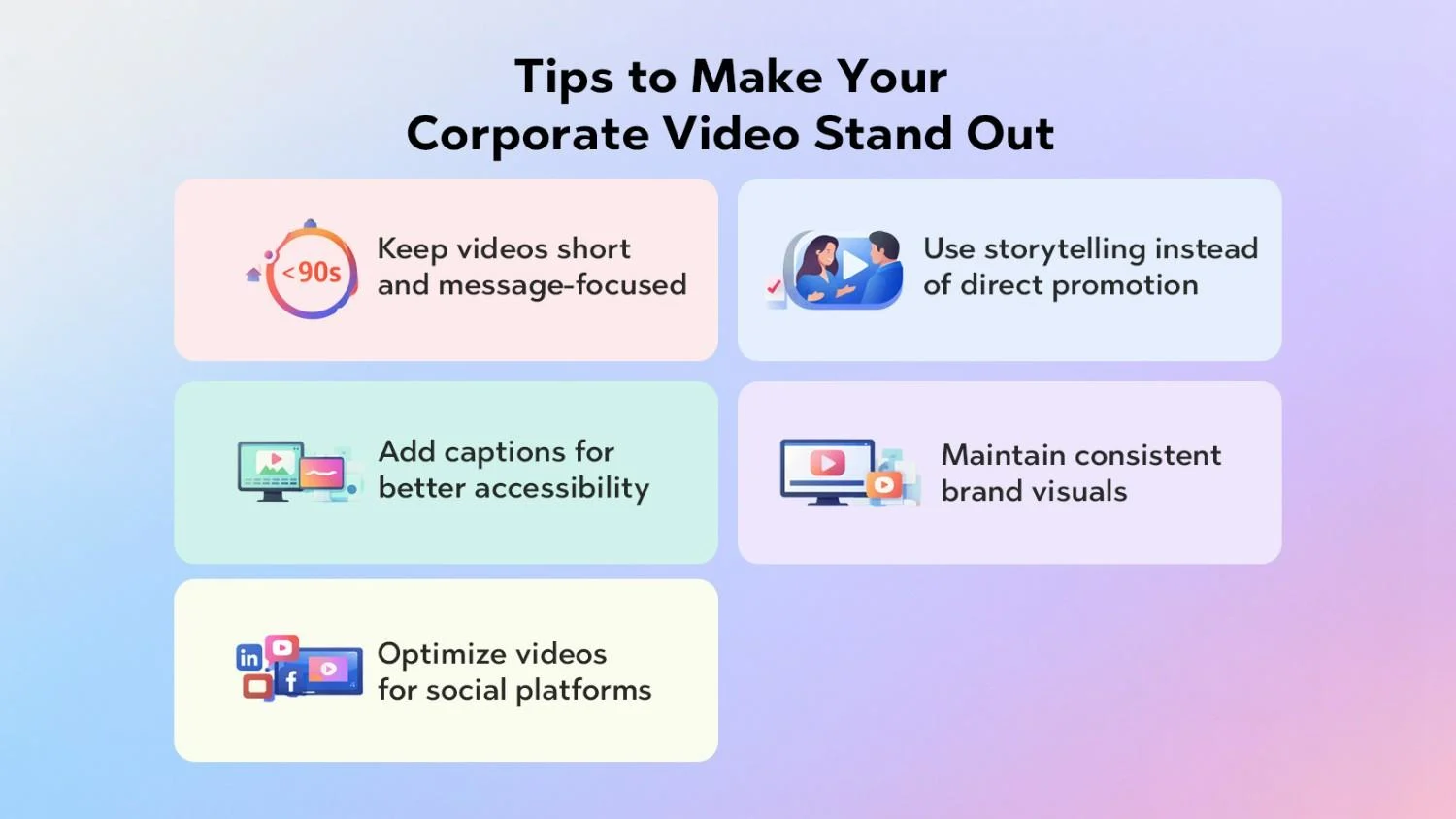
Plenty of businesses “make videos.” Only a few create videos that people remember and share. Here’s how you join the second group.
Attention is finite. If you try to say everything, viewers remember nothing.
● For top-of-funnel awareness, aim for 30–90 seconds.
● For deep product demos or training, you can go longer but keep each segment focused.
● Use one primary message and one primary call-to-action per video.
Ask yourself after editing: If viewers remember only one thing, what should it be? Then cut anything that distracts from that.
People connect with stories far more than feature lists.
You don’t have to produce a Hollywood script. Just:
● Put a real person at the center – a customer, an employee, or a founder.
● Frame the product as the helper, not the hero.
● Show a before/after journey: confusion → clarity, chaos → control, slow → fast.
Example pattern:
“Meet Riya, an HR manager drowning in spreadsheets…” “Here’s how she solved that with…” “Now she spends her time on people, not paperwork.”
This approach turns boring corporate messaging into Engaging Corporate Videos that feel human and memorable.
Captions help:
● Viewers watching on mute in offices, metros, and public spaces
● Non-native language speakers
● Viewers with hearing impairment
They also make your content more skimmable. People glance at captions, decide if the video’s worth their time, then commit.
Use on-brand caption styles and make text large enough for mobile screens.
Your audience should recognise your videos even if they see them out of context.
● Use a consistent intro style, logo reveal, and outro.
● Stick to the same color palette, fonts, and transitions.
● Align your video style with your website and other creative assets.
This visual consistency builds mental availability. Over time, your videos start to feel like part of a coherent brand universe, not random one-offs.
Every platform has its own culture and content expectations:
● LinkedIn: professional tone, B2B stories, behind-the-scenes, thought leadership clips.
● Instagram Reels: quick hooks, visually strong, trend-aware but still on-brand.
● YouTube: deeper how-tos, explainers, long-form demos, webinars.
● Facebook: community, regional markets, broader reach, often for mid-funnel.
Adapt:
● Hooks (first lines and visuals)
● Aspect ratios
● Length
● CTAs (comment, click, share, DM, etc.)
Don’t just upload the same 90-second horizontal video everywhere and hope for the best.
For platform-specific growth techniques and examples, explore the Top 10 Social Media Video Marketing.
Knowing what not to do is just as important as knowing best practices. Here are some traps that quietly kill video performance.
If you start with “We just need a video,” you’ll probably get a video that looks decent but doesn’t move any business metric.
Avoid this by:
● Defining a specific KPI before you begin
● Aligning the script and CTA with that KPI
● Deciding where the video lives in your funnel (awareness, consideration, decision, retention)
It’s tempting to cram every feature, every award, and every client logo into one piece.
The result?
● Viewers feel overwhelmed.
● The narrative loses focus.
● Nothing stands out.
Instead, create a video ecosystem:
● A short brand overview
● Separate deep dives for different features or use cases
● Short testimonial clips
● FAQ-style micro-videos
Spread your story across multiple touchpoints instead of dumping it all into one “mega video.”
Nothing screams “unprofessional” like grainy video and echoey audio.
Common issues:
● Backlighting (subject becomes a silhouette)
● Echoey rooms with hard walls and floors
● Loud ACs or traffic noise
● Inconsistent color between different shots
Fix the basics:
● Use even, soft light sources and avoid strong backlight.
● Add soft furnishings or foam panels to reduce echo.
● Choose quieter locations and test audio before recording.
● White-balance your camera or fix colors in editing.
Even if you shoot on a smartphone, good lighting and sound can make the video feel premium.
Most viewers now watch content on mobile screens held vertically.
Ignoring this reality leads to:
● Tiny text that’s unreadable
● Cropped faces or important visuals in vertical feeds
● Uncaptivating thumbnails that don’t stand out in a scroll
Bake mobile-first thinking into your process:
● Design text and graphics to be legible on small screens.
● Frame key subjects centrally so you can crop to vertical later.
● Test how your video looks on an actual phone before publishing.
You’ve kept people till the end – great. Now what?
If you don’t tell viewers what to do next, you leave value on the table.
Strong CTAs:
● “Book a 15-minute demo to see this in action.”
● “Download the full case study in the link below.”
● “Share this video with a teammate who handles onboarding.”
● “Visit our pricing page to compare plans.”
Tie your CTA directly to your original video goal and make it simple, specific, and easy to do.
To understand the complete video marketing ecosystem and how all the pieces tie together, refer to Professional Video Production & Marketing Services Overview.
Once you’ve nailed the basics, you can layer more sophistication into your video strategy.
Instead of creating one big video and stopping there:
● Plan shoots so each session yields multiple assets.
● Capture extra b-roll that you can reuse across videos.
● Record alternative intros and CTAs for different segments or campaigns.
This approach turns a single shoot day into weeks or months of content for your website, paid media, and social channels.
Most platforms give you rich video analytics:
● View-through rates (where do people drop off?)
● Average watch time
● Click-through rates from end screens or links
● Engagement (comments, shares, saves)
Use this data to answer:
● Which hooks retain attention best?
● Which topics get the most watch time?
●t CTAs drive real conversions?
Run small experiments – different hooks, thumbnails, or lengths – and treat video as a continuous learning loop, not a one-off project.
For multi-region or multi-segment brands:
● Add subtitles in local languages.
● Record region-specific intros or CTAs.
● Show examples and case studies that match the viewer’s industry.
Even small tweaks can lift engagement dramatically because viewers feel like the video “speaks their language” – literally and figuratively.
You can produce simple videos in-house. Many brands start there. But as stakes grow – bigger campaigns, higher ad spend, more complex stories – working with Professional Video Production partners often makes sense.
Here’s what a good partner typically brings:
● Strategy first – They help clarify objectives, funnels, and audience before touching a camera.
● Specialised roles – Scriptwriters, directors, cinematographers, editors, motion designers, colorists, sound engineers.
● High-quality equipment – Cameras, lenses, lighting, audio gear, stabilisers, drones where needed.
● End-to-end process – From concept and pre-production to shoot management, post-production, and platform optimisation.
● Scalability – Ability to plan video content calendars, batches of shoots, and multi-channel campaigns.
If you’re at the stage where video sits at the heart of your marketing and brand, partnering with a specialist team lets your internal team stay focused on strategy, product, and customers while the production engine runs in the background.
Engaging corporate videos don’t happen by accident. They come from clear strategy, sharp scripting, thoughtful visuals, and disciplined execution.
If you:
● Build a tight, story-led script
● Plan your visuals and production style deliberately
● Capture clean video and audio
● Edit for clarity, branding, and platform fit
…then you’re already ahead of most companies just “doing video because everyone else is.”
Use these Corporate Video Production Tips as your checklist for the next project. Treat every video as both a story and a business asset. Over time, your organisation builds a library of content that educates, persuades, and converts – 24/7, across every digital touchpoint.
Corporate video production is the process of planning, scripting, filming, and editing videos for business objectives such as marketing, training, branding, or internal communication. It includes everything from brand films and explainer videos to testimonials and employee onboarding videos, all designed to deliver clear messages and drive specific actions.
There’s no one-size-fits-all length, but some practical guidelines:
● Brand or promo videos: 30–90 seconds
● Product explainers or demos: 60–180 seconds
● Training or onboarding modules: 3–10 minutes, broken into chapters
● Event recaps: 60–120 seconds highlight reels
Focus less on an exact duration and more on how efficiently you deliver value. Cut anything that doesn’t serve the core message.
Corporate videos improve engagement by combining visuals, audio, and storytelling to:
● Capture attention faster than text-heavy content
● Explain complex ideas in a simpler, more memorable way
● Put real faces and voices to your brand, building trust
● Provide content people can share easily with teammates and friends
When paired with strong hooks, clear structure, and a solid CTA, Engaging Corporate Videos lift time-on-page, click-through rates, and conversions across your digital ecosystem.
Your exact kit depends on budget and ambition, but a typical setup includes:
● Camera – DSLR/mirrorless, cinema camera, or high-end smartphone
● Lenses – A mix of wide and portrait lenses for variety
● Audio – Lavalier mics, shotgun mic, audio recorder, and monitoring headphones
● Lighting – Softbox lights, LED panels, reflectors
● Stabilisation – Tripod, monopod, or gimbal
● Accessories – Extra batteries, memory cards, stands, extension cables
More important than gear is knowing how to use it – framing, lighting, and sound capture techniques often matter more than the camera brand.
It depends on your goals, budget, and internal skills.
Do it in-house if:
● You’re testing the video for the first time.
● You need quick, low-stakes content (simple updates, rough demos).
● You have team members comfortable with cameras and basic editing.
Hire professionals if:
● The video will sit on key pages (home page, product pages, ad campaigns).
● You need consistent quality across many videos.
● You don’t have time to manage scripting, shooting, and editing yourself.
● You want to build a long-term video strategy, not just a one-off project.
Often, the best approach blends both: keep simple, everyday videos in-house and partner with a Professional Video Production team for flagship campaigns and high-impact assets.