
Rahul Guleria
SEO Executive
Creative,
Branding
& Growth
in the Global
Digital Ecosystem
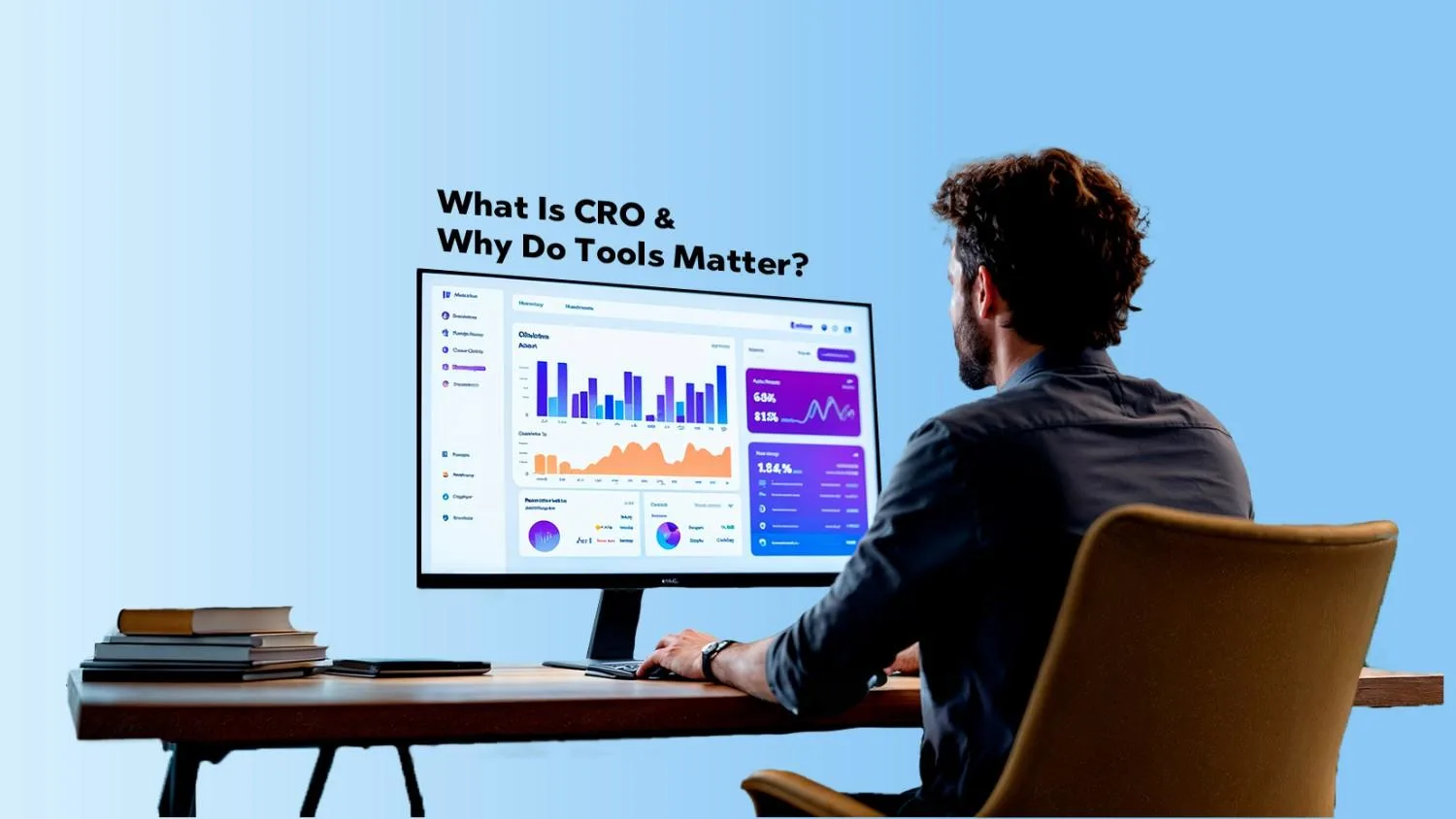
Conversion Rate Optimization (CRO) is the practice of increasing the percentage of visitors that take a desired action on your website or app – think purchases, sign-ups, demo requests, or downloads. In simple terms, CRO turns more of your existing traffic into paying (or engaged) customers.
CRO tools make this process measurable, repeatable, and scalable. They help you test ideas, analyze user behavior, and optimize experiences without guessing. In 2025 and 2026, the best CRO Software is increasingly:
● AI-assisted (smart traffic routing, predictive segments)
● Analytics-driven (deep funnels, behavioral insights)
● Privacy-aware (GDPR/CCPA ready, first-party data)
If you’ve been researching the Best CRO Tools in 2025, you’ve probably noticed many of the same platforms still dominate in 2026 – but they’ve added more AI, deeper integrations, and better UX. This guide walks you through the Best Conversion Optimization Tools to consider now, how they compare, and how to choose the right one for your stack.
If you’re new to CRO, you might also want to check out: What is Conversion Rate Optimization (CRO)
● Conversion Rate Optimization (CRO) is the process of systematically improving your website or app so more visitors perform key actions – like buy, sign up, or request a quote.
● CRO tools provide the experimentation engines, analytics, and UX data needed to make those improvements based on real user behavior instead of gut feeling.
In 2026, you’re no longer just running basic A/B tests. Top Conversion Rate Optimization Tools combine:
● A/B & multivariate testing
● Heatmaps and session recordings
● Funnel analytics
● Personalization powered by AI
● Integrations with analytics, CRMs, and ad platforms
That mix turns raw traffic into insight and then into revenue.
For a deeper overview of our strategy, you can also explore our service page on Conversion Rate Optimization.
Here’s what modern CRO Software in 2025–2026 helps you achieve:
● Increase website conversion rates – Turn more visitors into leads, buyers, and subscribers without paying for more traffic.
● Improve user experience (UX) – See where people struggle on your site and fix friction points.
● Optimize landing pages and forms – Test headlines, layouts, CTAs, and form fields to remove friction and confusion.
● Run A/B and multivariate tests – Compare versions scientifically instead of guessing which variant “feels right”.
● Make data-driven decisions – Replace opinions and HiPPOs (highest paid person’s opinion) with behavioral evidence.
● Reduce bounce rate and drop-offs – Identify why people leave key pages or funnels and patch the leaks.
● Maximize ROI from marketing campaigns – When your site converts better, every paid click, social post, and email works harder.
When you compare the Best CRO Tools in 2025 and 2026, most leaders share a similar feature set. Here’s what to look for and why it matters.
You want a tool that lets you:
● Test single changes (A/B testing)
● Test multiple elements at once (multivariate or A/B/n)
● Control traffic splits and experiment duration
● Calculate statistical significance and confidence levels
Platforms like Optimizely, VWO, Convert.com, and Unbounce all offer robust experimentation engines.
Heatmaps (click, scroll, move) and session replays show:
● Where users click or tap
● How far they scroll
● Which elements do they ignore
● How they move through forms or funnels
Tools like Hotjar and Crazy Egg are leaders here, offering unlimited or generous heatmap usage with replay features.
You need to:
● Map your key funnels (e.g., home → product → cart → checkout)
● See drop-off rates at every step
● Segment by device, traffic source, or campaign
Many CRO platforms now integrate with GA4 or have their own funnel analytics so you can connect experiments to revenue.
Modern tools let you:
● Show different content to different segments (device, location, traffic source, behavior)
● Trigger experiences based on actions (exit intent, inactivity, scroll depth)
● Use AI to route visitors to the best variant automatically (e.g., Unbounce Smart Traffic).
In 2026, leading CRO software offers:
● AI suggestions for what to test next
● Smart traffic routing to high-performing variants
● Predictive audiences or behavioral segments
Unbounce, Hotjar (now part of Contentsquare), and Optimizely all lean into AI-driven optimization and analytics.
Look for:
● GA4 and BigQuery integration
● Connections to CRMs (HubSpot, Salesforce), ESPs, and ad platforms
● Webhooks or APIs for custom workflows
Hotjar, VWO, and others integrate with analytics, product analytics, and marketing tools so experiments and user insights don’t live in a silo.
You’ll want:
● Clear dashboards with lift, revenue impact, and experiment status
● Segment filters (device, channel, location
● Export to spreadsheets or BI tools
The more experimentation you do, the more you’ll rely on this reporting layer to prioritize and communicate wins.
Let’s dive into the Best Conversion Optimization Tools you should seriously consider this year.
What it is: Optimizely is an enterprise-grade experimentation and digital experience platform. It’s built for teams that run serious, continuous testing programs with multiple stakeholders and complex architectures.
● Advanced A/B, multivariate, and feature flag testing
● Web, product, and full-stack experimentation
● Robust audience targeting and personalization
● Deep analytics and goal tracking with custom metrics
● Integrations with GA4 and major martech tools
● Extremely powerful for enterprise and high-traffic websites
● Great UI for managing many experiments at once
● Strong support, documentation, and partner ecosystem
● Pricing is high compared to most tools – plans often start in the tens of thousands per year
● Overkill for very small businesses or simple sites
● Implementation usually needs dev support and governance
Exact pricing is quote-based, but recent analysis shows Optimizely Web Experimentation often starts around $36,000+ per year, and can rise significantly based on traffic and features.
● Mid-size to large enterprises
● Teams that already have a mature CRO program
● Organizations that want experimentation embedded across product, marketing, and engineering
What it is: VWO is an all-in-one experimentation and experience optimization platform with testing, heatmaps, session recordings, and surveys under one roof. It’s widely used as an alternative to Google Optimize.
● A/B, split URL, multivariate testing
● Heatmaps, scrollmaps, and session recordings
● On-page surveys and feedback widgets
● Funnels and form analytics
● AI-powered insights and website optimization recommendations
● Combines experimentation + behavior analytics in one tool
● Offers a free starter plan for low-traffic sites
● Flexible pricing as you scale
● Good middle ground between power and usability
● UI can feel complex for complete beginners
● Advanced features are gated behind higher tiers
● Data sampling and limits on some lower plans
Recent breakdowns indicate:
● Free plan for small sites with limited traffic
● Paid plans for testing typically start around $99–$314 per month, scaling up with MTUs (monthly tested users) and features.
● Small to mid-market businesses that want testing + heatmaps in one place
● Agencies managing multiple client sites
● Teams transitioning from Google Optimize to a more capable platform
What it is: Hotjar is a beloved behavioral analytics suite offering heatmaps, session recordings, surveys, and feedback. It’s now integrated into Contentsquare, but maintains its familiar UX and focus on understanding real user behavior.
● Click, scroll, and move heatmaps
● Session recordings to watch real user journeys
● Funnels and form analysis
● On-site surveys and NPS
● Dashboards and team collaboration tools
● Very easy to set up – non-technical marketers love it
● Generous free plan for smaller sites (up to a traffic limit)
● Excellent for discovering UX issues before you even test
● Deep integration with broader Contentsquare analytics
Conversion Rate Optimization (CRO) is the practice of increasing the percentage of visitors that take a desired action on your website or app – think purchases, sign-ups, demo requests, or downloads. In simple terms, CRO turns more of your existing traffic into paying (or engaged) customers.
CRO tools make this process measurable, repeatable, and scalable. They help you test ideas, analyze user behavior, and optimize experiences without guessing. In 2025 and 2026, the best CRO Software is increasingly:
● AI-assisted (smart traffic routing, predictive segments)
● Analytics-driven (deep funnels, behavioral insights)
● Privacy-aware (GDPR/CCPA ready, first-party data)
If you’ve been researching the Best CRO Tools in 2025, you’ve probably noticed many of the same platforms still dominate in 2026 – but they’ve added more AI, deeper integrations, and better UX. This guide walks you through the Best Conversion Optimization Tools to consider now, how they compare, and how to choose the right one for your stack.
If you’re new to CRO, you might also want to check out: What is Conversion Rate Optimization (CRO)
● Conversion Rate Optimization (CRO) is the process of systematically improving your website or app so more visitors perform key actions – like buy, sign up, or request a quote.
● CRO tools provide the experimentation engines, analytics, and UX data needed to make those improvements based on real user behavior instead of gut feeling.
In 2026, you’re no longer just running basic A/B tests. Top Conversion Rate Optimization Tools combine:
● A/B & multivariate testing
● Heatmaps and session recordings
● Funnel analytics
● Personalization powered by AI
● Integrations with analytics, CRMs, and ad platforms
That mix turns raw traffic into insight and then into revenue.
For a deeper overview of our strategy, you can also explore our service page on Conversion Rate Optimization.
Here’s what modern CRO Software in 2025–2026 helps you achieve:
● Increase website conversion rates – Turn more visitors into leads, buyers, and subscribers without paying for more traffic.
● Improve user experience (UX) – See where people struggle on your site and fix friction points.
● Optimize landing pages and forms – Test headlines, layouts, CTAs, and form fields to remove friction and confusion.
● Run A/B and multivariate tests – Compare versions scientifically instead of guessing which variant “feels right”.
● Make data-driven decisions – Replace opinions and HiPPOs (highest paid person’s opinion) with behavioral evidence.
● Reduce bounce rate and drop-offs – Identify why people leave key pages or funnels and patch the leaks.
● Maximize ROI from marketing campaigns – When your site converts better, every paid click, social post, and email works harder.
When you compare the Best CRO Tools in 2025 and 2026, most leaders share a similar feature set. Here’s what to look for and why it matters.
You want a tool that lets you:
● Test single changes (A/B testing)
● Test multiple elements at once (multivariate or A/B/n)
● Control traffic splits and experiment duration
● Calculate statistical significance and confidence levels
Platforms like Optimizely, VWO, Convert.com, and Unbounce all offer robust experimentation engines.
Heatmaps (click, scroll, move) and session replays show:
● Where users click or tap
● How far they scroll
● Which elements do they ignore
● How they move through forms or funnels
Tools like Hotjar and Crazy Egg are leaders here, offering unlimited or generous heatmap usage with replay features.
You need to:
● Map your key funnels (e.g., home → product → cart → checkout)
● See drop-off rates at every step
● Segment by device, traffic source, or campaign
Many CRO platforms now integrate with GA4 or have their own funnel analytics so you can connect experiments to revenue.
Modern tools let you:
● Show different content to different segments (device, location, traffic source, behavior)
● Trigger experiences based on actions (exit intent, inactivity, scroll depth)
● Use AI to route visitors to the best variant automatically (e.g., Unbounce Smart Traffic).
In 2026, leading CRO software offers:
● AI suggestions for what to test next
● Smart traffic routing to high-performing variants
● Predictive audiences or behavioral segments
Unbounce, Hotjar (now part of Contentsquare), and Optimizely all lean into AI-driven optimization and analytics.
Look for:
● GA4 and BigQuery integration
● Connections to CRMs (HubSpot, Salesforce), ESPs, and ad platforms
● Webhooks or APIs for custom workflows
Hotjar, VWO, and others integrate with analytics, product analytics, and marketing tools so experiments and user insights don’t live in a silo.
You’ll want:
● Clear dashboards with lift, revenue impact, and experiment status
● Segment filters (device, channel, location
● Export to spreadsheets or BI tools
The more experimentation you do, the more you’ll rely on this reporting layer to prioritize and communicate wins.
Let’s dive into the Best Conversion Optimization Tools you should seriously consider this year.
What it is: Optimizely is an enterprise-grade experimentation and digital experience platform. It’s built for teams that run serious, continuous testing programs with multiple stakeholders and complex architectures.
● Advanced A/B, multivariate, and feature flag testing
● Web, product, and full-stack experimentation
● Robust audience targeting and personalization
● Deep analytics and goal tracking with custom metrics
● Integrations with GA4 and major martech tools
● Extremely powerful for enterprise and high-traffic websites
● Great UI for managing many experiments at once
● Strong support, documentation, and partner ecosystem
● Pricing is high compared to most tools – plans often start in the tens of thousands per year
● Overkill for very small businesses or simple sites
● Implementation usually needs dev support and governance
Exact pricing is quote-based, but recent analysis shows Optimizely Web Experimentation often starts around $36,000+ per year, and can rise significantly based on traffic and features.
● Mid-size to large enterprises
● Teams that already have a mature CRO program
● Organizations that want experimentation embedded across product, marketing, and engineering
What it is: VWO is an all-in-one experimentation and experience optimization platform with testing, heatmaps, session recordings, and surveys under one roof. It’s widely used as an alternative to Google Optimize.
● A/B, split URL, multivariate testing
● Heatmaps, scrollmaps, and session recordings
● On-page surveys and feedback widgets
● Funnels and form analytics
● AI-powered insights and website optimization recommendations
● Combines experimentation + behavior analytics in one tool
● Offers a free starter plan for low-traffic sites
● Flexible pricing as you scale
● Good middle ground between power and usability
● UI can feel complex for complete beginners
● Advanced features are gated behind higher tiers
● Data sampling and limits on some lower plans
Recent breakdowns indicate:
● Free plan for small sites with limited traffic
● Paid plans for testing typically start around $99–$314 per month, scaling up with MTUs (monthly tested users) and features.
● Small to mid-market businesses that want testing + heatmaps in one place
● Agencies managing multiple client sites
● Teams transitioning from Google Optimize to a more capable platform
What it is: Hotjar is a beloved behavioral analytics suite offering heatmaps, session recordings, surveys, and feedback. It’s now integrated into Contentsquare, but maintains its familiar UX and focus on understanding real user behavior.
● Click, scroll, and move heatmaps
● Session recordings to watch real user journeys
● Funnels and form analysis
● On-site surveys and NPS
● Dashboards and team collaboration tools
● Very easy to set up – non-technical marketers love it
● Generous free plan for smaller sites (up to a traffic limit)
● Excellent for discovering UX issues before you even test
● Deep integration with broader Contentsquare analytics
● Not a full A/B testing engine on its own (you’ll pair it with testing tools like VWO, Optimizely, or Convert)
● Can collect a lot of data – you need discipline to interpret and act
Recent information shows Hotjar plans start at €0 and scale up to €9,500+ per month for enterprise needs, depending on traffic and features.
● Any business that wants to see how users behave, not just read numbers
● Teams wanting to pair behavior insights with a separate testing tool
● UX, product, and growth teams collaborating on improvements
You’ll still see “Google Optimize 360” on many older “Best CRO Tools in 2025” lists, so let’s clear this up.
Reality check: Google Optimize and Optimize 360 were sunset on 30 September 2023 and are no longer available.
Google’s focus shifted to:
● Better integrations between GA4 and third-party testing tools
● Using GA4 as the core analytics and measurement layer while partners handle experimentation
So, while you can’t use Google Optimize 360 in 2026, it’s worth mentioning because:
● You might be migrating from it
● You’ll still see it referenced in older content and internal docs
If you previously relied on Optimize/Optimize 360, the most common replacements are:
● VWO – strong testing + heatmaps
● Optimizely – enterprise experimentation platform
● Convert.com – privacy-first A/B testing
● Unbounce – for landing page–focused experimentation
What it is: Unbounce is a landing page builder and CRO platform focused on paid traffic and campaigns. It lets marketers build, test, and optimize pages without developers.
● Drag-and-drop landing page builder
● A/B and A/B/n testing for landing pages, popups, and sticky bars
● Smart Traffic – AI that routes users to the best-performing variant
● Templates optimized for lead generation and ecommerce
● Built-in form handling and lead integrations (CRM, ESP, etc.)
● Perfect for marketers managing paid campaigns and funnels
● No-code builder – go live without dev support
● AI optimization (Smart Traffic) can boost conversions faster than manual testing in some cases
● Best suited for campaign-specific pages, not entire websites
● You pay per domain and traffic, which can add up at scale
● Not as deep on behavioral analytics as Hotjar or Crazy Egg
Unbounce typically starts with affordable plans for smaller businesses and scales up for higher traffic and more domains. Many plans include unlimited A/B testing and Smart Traffic. Exact pricing changes frequently, but you can usually:
● Start with a free trial
● Choose between plans designed for small, growing, and enterprise teams
● Businesses investing heavily in Google Ads, Meta Ads, or paid social
● Agencies managing multiple campaign-specific landing pages
● Teams that want fast testing cycles on standalone pages
What it is: Crazy Egg offers visual website analytics (heatmaps, scrollmaps), A/B testing, and basic UX insights in a simple interface. It’s often a “starter CRO suite” for growing businesses.
● Heatmaps, scrollmaps, and confetti click reports
● Session recordings
● Built-in A/B testing for pages
● Simple visual reports and snapshots
● Integrations with common CMS and analytics tools
● Very easy to get started with
● 30-day free trial on all plans
● Great for quickly spotting obvious UX issues
● Affordable compared to some enterprise tools
● Some users find it lacks more advanced features compared to Hotjar or full CRO suites
● Testing capabilities are more basic than Optimizely/VWO/Convert
Crazy Egg offers tiered pricing based on page views and features. Recent reviews suggest it remains one of the more affordable visual analytics tools with A/B testing baked in.
● Small to mid-size businesses ready to go beyond Google Analytics
●Teams wanting a simple bundle of heatmaps + basic tests
● Marketers who prefer visual reports over complex dashboards
What it is: Convert.com is a privacy-focused A/B testing and personalization platform, popular with teams that care deeply about GDPR and performance.
● A/B, split URL, and multivariate testing
● Server-side and client-side experimentation
● Advanced audience targeting and segmentation
● First-party cookies and privacy-by-design architecture
● Extensive support for GDPR, TTDSG, and related regulations
● Transparent pricing with plans starting around $399/month
● Strong commitment to GDPR and privacy – excellent for EU-heavy traffic
● Lightweight snippet and performance-conscious implementation
● No heatmaps or session recordings – you’ll pair it with tools like Hotjar
● Interface is more “practitioner-focused” and may feel less flashy than some competitors
Convert Experiences plans often start around $399/month and scale based on monthly tested users (MTUs). They emphasize flat, all-in pricing with no hidden modules.
● Companies operating in highly regulated markets or with strict privacy requirements
● Teams needing robust testing but already using separate analytics/UX tools
● Agencies running tests across large EU or privacy-sensitive audiences
Here’s a simplified comparison of the Best CRO Tools in 2026:
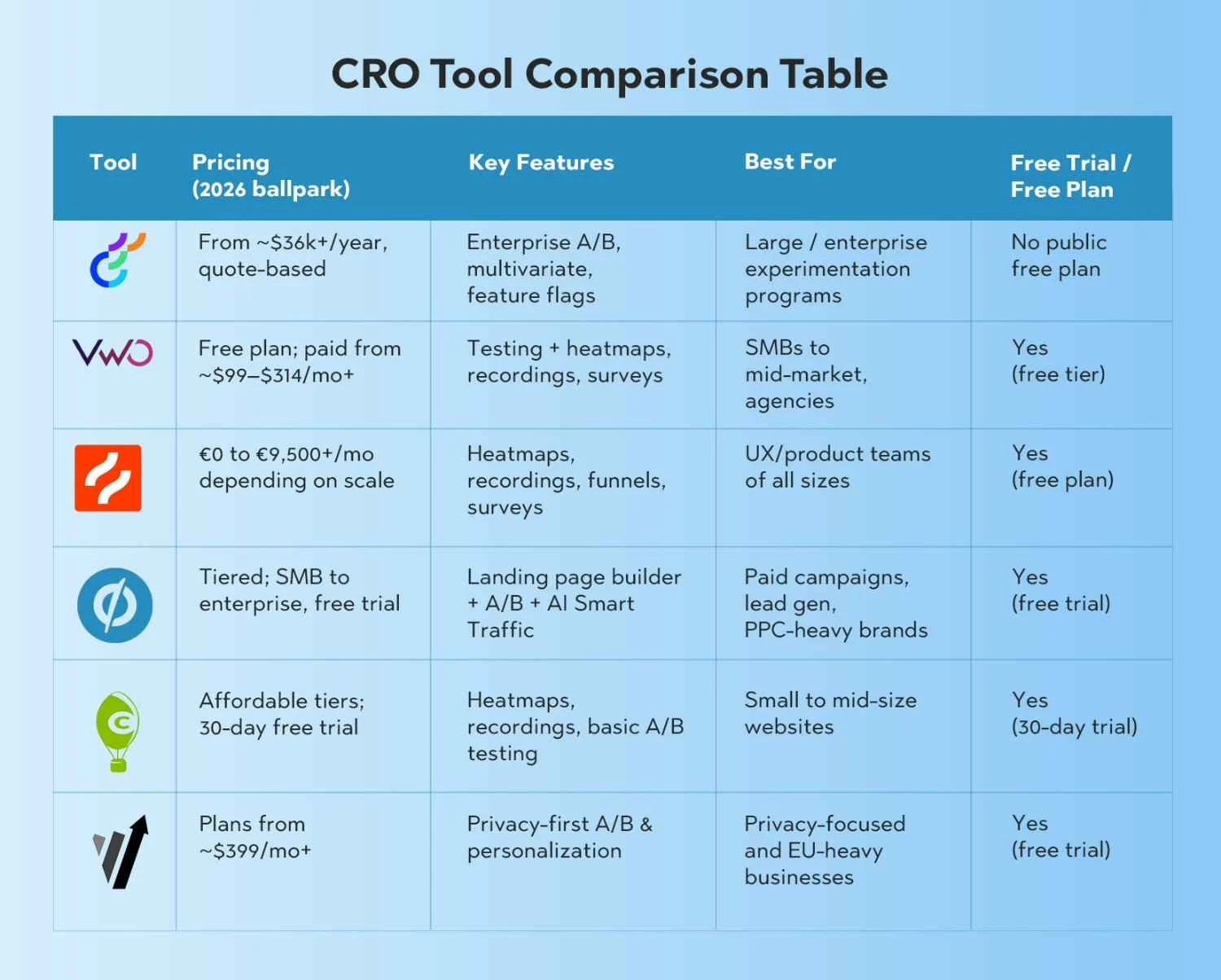
Tool | Pricing (2026 ballpark | Key Features | Best For | Free Trial / Free Plan |
|---|---|---|---|---|
Optimizely | From ~$36k+/year, quote-based | Enterprise A/B, multivariate, feature flags | Large / enterprise experimentation programs | No public free plan |
VWO | Free plan; paid from ~$99–$314/mo+ | Testing + heatmaps, recordings, surveys | SMBs to mid-market, agencies | Yes (free tier) |
Hotjar | €0 to €9,500+/mo depending on scale | Heatmaps, recordings, funnels, surveys | UX/product teams of all sizes | Yes (free plan) |
Unbounce | Tiered; SMB to enterprise, free trial | Landing page builder + A/B + AI Smart Traffic | Paid campaigns, lead gen, PPC-heavy brands | Yes (free trial) |
Crazy Egg | Affordable tiers; 30-day free trial | Heatmaps, recordings, basic A/B testing | Small to mid-size websites | Yes (30-day trial) |
Convert.com | Plans from ~$399/mo+ | Privacy-first A/B & personalization | Privacy-focused and EU-heavy businesses | Yes (free trial) |
Note: Google Optimize 360 is not included here because it was sunset in 2023.
With so many Conversion Rate Optimization Tools around, how do you pick one without going down a rabbit hole?
● Small businesses/startups:
○ Prioritize tools with free tiers or low-cost plans like Hotjar, Crazy Egg, and VWO starter plans.
● Mid-market:
○ Look at VWO, Unbounce, and Convert.com as strong, scalable options.
● Enterprise:
○ Evaluate Optimizely or a combination of enterprise suites plus specialized tools.
● Campaign landing pages: Unbounce is hard to beat.
● Content-heavy sites (blogs, SaaS, marketplaces): VWO, Convert, or Optimizely with Hotjar or Crazy Egg.
● Custom web apps or complex infrastructure: Optimizely or Convert full-stack experimentation.
Ask yourself:
● Do you need just A/B testing, or also heatmaps and session recordings?
● Is personalization important right now, or can it wait?
● Are feature flags and product-level experimentation part of your roadmap?
Use that to rule out tools that don’t fit your minimum requirements.
● If marketing owns CRO, lean towards user-friendly tools like Unbounce, VWO, and Hotjar.
● If product/engineering leads experimentation, Optimizely or Convert might fit better.
● Check native integrations with GA4, CRM, ESP, and CDP to avoid sync headaches.
If your leadership wants to see:
● Revenue lift per experiment
● Funnel impact
● Cohort-level performance
…then you’ll want a tool that either provides those reports out-of-the-box or integrates tightly with GA4 or BI tools.
You’ll see a wide range when you compare CRO Software 2025–2026 pricing.
● Free plans (Hotjar, VWO starter, some Unbounce trials) are great to start experimenting and prove value.
● Paid plans unlock higher traffic limits, more tests, advanced targeting, or additional features (like surveys, advanced funnels, or multivariate testing).
High-level ranges, based on recent industry breakdowns:
● Small businesses: ~$0–$300/month
● Mid-market: ~$300–$2,000/month
● Enterprise: $2,000/month up to six-figure annual contracts (Optimizely and similar)
● Extra seats or user licenses
● Add-ons like advanced modules, additional domains, or more MTUs
● Implementation and dev time if your stack is complex
● Onboarding and professional services (some enterprise tools require it)
So why invest in CRO tools now – especially when AI, cookies, and privacy rules keep changing?
Traffic costs are rising across paid channels. CRO tools let you squeeze more revenue from the same traffic instead of constantly increasing ad spend.
User behavior is increasingly cross-device. Modern tools help you:
● Test mobile-first layouts
● Compare performance across device types
● Fix mobile-specific UX issues like tap targets and scroll depth
In 2026, more tools use AI to:
● Route visitors automatically to the best variant (e.g., Smart Traffic in Unbounce)
● Suggest tests based on observed behavior and anomalies
● Surface “quick wins” without your team manually slicing data
CRO tools turn vague questions like “Why is our conversion rate low?” into testable hypotheses with measurable outcomes. You stop arguing about button colors and start debating impact and ROI.
Competitors are:
● Testing their ad messages and landing pages
● Running structured experiments
● Doubling down on experiences that convert
Without a CRO stack, you’re essentially flying blind while others are using radar.
Even the Best CRO Tools in 2025–2026 can’t save a bad process. Watch out for these traps.
Running tests only on desktop is a classic mistake. Mobile often represents the majority of your traffic. Always:
● Segment results by device
● Consider mobile-first variations
● Use heatmaps and recordings specifically for small screens
A test might “lose” overall but win big for a profitable segment (e.g., paid search traffic or return visitors). Segment by:
● Channel / campaign
● New vs returning
● Geography
● Device type
Stopping tests too early leads to bad decisions. Make sure you have:
● Enough sample size
● Enough time to capture behavior across weekdays and weekends
● Statistical significance (or a clear decision rule if using Bayesian tools)
You don’t need to start with 8-variant multivariate tests. Simple changes such as:
● Clearer headlines
● Stronger CTAs
● Fewer form fields
…can unlock meaningful gains with much less complexity.
Stacking five tools without a plan can cause:
● Tag bloat and slower site speed
● Conflicting scripts
● Fragmented data
Start with a core stack (e.g., one testing tool + one behavior analytics tool) and expand only when you have processes to support it.
Let’s wrap it up with some practical recommendations.
● Hotjar – For understanding user behavior with heatmaps, recordings, and surveys on a generous free or low-cost plan.
● Crazy Egg – Easy visual analytics plus basic A/B testing at an affordable price.
● VWO (Starter / lower tiers) – To combine testing + basic insights once you’re ready to experiment more seriously.
● VWO (full platform) – Comprehensive testing + behavioral analytics + surveys.
● Unbounce – For paid campaigns and landing-page-heavy funnels with AI-optimized routing.
● Convert.com – For privacy-conscious A/B testing with solid targeting and performance.
● Optimizely – Full-stack experimentation at scale, across web and product.
● Convert.com – Privacy-first and performance-focused alternative to heavier suites.
● VWO (Enterprise) – All-in-one optimization with enterprise-grade features and support.
You don’t need one tool to “do everything”. A powerful and realistic 2026 stack might look like:
● Testing engine: VWO, Convert, or Optimizely
● Behavior analytics: Hotjar or Crazy Egg
● Landing pages: Unbounce
● Analytics foundation: GA4 or similar
From there, you can layer on consulting, processes, and strategy. If you’d like help designing or running your experimentation program, explore our Conversion Rate Optimization services.
The top Conversion Rate Optimization Tools in 2026 include Optimizely, VWO, Hotjar, Unbounce, Crazy Egg, and Convert.com. Each has a different focus – from enterprise experimentation to landing page optimization and behavior analytics.
For most small businesses:
● Hotjar or Crazy Egg for behavior analytics
● VWO starter plans for basic testing
These tools balance cost, ease of use, and impact, so you can start optimizing without a big budget.
Yes. When used correctly, CRO tools help you:
● Discover UX problems
●Test improvements
● Roll out winning variants
Brands using A/B testing and behavior analytics often see significant lifts in conversion rates and revenue when they run structured experimentation programs.
Yes. Several tools offer free tiers or trials:
● Hotjar – free tier with session limits
● VWO – free starter plan for low-traffic sites
● Crazy Egg – 30-day free trial
● Unbounce – free trial for new users
These are perfect for testing the waters before committing to paid plans.
Consider:
Then shortlist two or three tools, run trials, and pick the one your team will actually use.
It depends:
● Tools like Unbounce, Hotjar, and Crazy Egg are marketer-friendly and no-code.
● Tools like Optimizely and Convert can require dev and product involvement, especially for full-stack or server-side experimentation.
Most modern platforms offer visual editors for simple tests and more advanced options for technical teams.
Several tools in this guide offer A/B testing:
● Optimizely
● VWO
● Unbounce
● Crazy Egg
● Convert.com
Hotjar focuses more on behavior analytics and is usually paired with a testing tool.
Costs vary widely, but as a rough guide:
● Small business tools: ~$0–$300/month
● Mid-market tools: ~$300–$2,000/month
● Enterprise suites (like Optimizely): $36,000+/year and up
Your cost depends on traffic, features, and how many domains or projects you manage.
Usually, no. Most CRO tools focus on experimentation and experience optimization, not on replacing:
● Email service provider
● CRMs
● Full analytics platforms
Many teams use a CRO tool stack alongside GA4, CRM, and other martech, rather than expecting one tool to do everything.
If you’re just starting, prioritize:
From there, you can layer on advanced features like personalization, AI optimization, and full-stack testing as your CRO maturity grows.